Today I was trying to retrieve user profiles properties using a console application. Its a very simple application just pulls some metadata from the userprofilesmanager. Previously I have get and set profile properties in my SharePoint application many times. Thought it would be a piece of cake for me. Not though.
This is the code I have written in the program.cs. But to my surprise I was getting object reference error. I was thinking that url might be the wrong thing. But its not.
SPSite site = new SPSite("http://suresh-pc:100/default.aspx");
ServerContext context = ServerContext.GetContext(site);
UserProfileManager upm = new UserProfileManager(context);
UserProfile profile = upm.GetUserProfile("moss/suresh");
This error is a misleading one. You dont have permission to pull data from User Profile Service application basically.
Go to Central Admin- Manage Service applications- Click User Profile Service Application(click the row not the link).- In the ribbon select Manage Permmissions
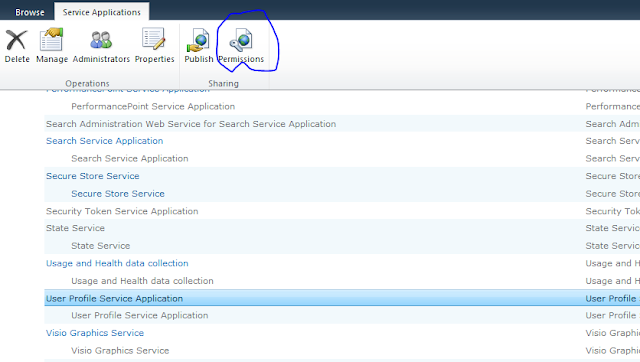
Provide full permission for the user trying to access the User profile manager.
Build the application and run again.
This is the code I have written in the program.cs. But to my surprise I was getting object reference error. I was thinking that url might be the wrong thing. But its not.
SPSite site = new SPSite("http://suresh-pc:100/default.aspx");
ServerContext context = ServerContext.GetContext(site);
UserProfileManager upm = new UserProfileManager(context);
UserProfile profile = upm.GetUserProfile("moss/suresh");
This error is a misleading one. You dont have permission to pull data from User Profile Service application basically.
Go to Central Admin- Manage Service applications- Click User Profile Service Application(click the row not the link).- In the ribbon select Manage Permmissions

Provide full permission for the user trying to access the User profile manager.
Build the application and run again.


thanks, this helped
ReplyDeletethank you !!
ReplyDeletethank you so much!! :)
ReplyDelete